Software for handling PDR damage and repairs

Less retyping. Fewer phone calls. More finished repairs.

WE-PDR is a web app for PDR technicians, workshops and companies handling damage across multiple locations. It brings inspections, photos, cost estimates, documents and repair planning together in one system.

The technician documents the damage at the car, the office has up-to-date data straight away, and the workshop prepares the estimate and starts the repair sooner. Every job has complete documentation, an activity history and its current stage.

  • Faster inspections at the car
  • Cost estimates without retyping data
  • Fewer errors and lost documents
  • Control over technicians and branches
PLN 0 to sign up, no card needed
Phone and tablet no installation, runs in the browser
PL / EN / DE interface and documents
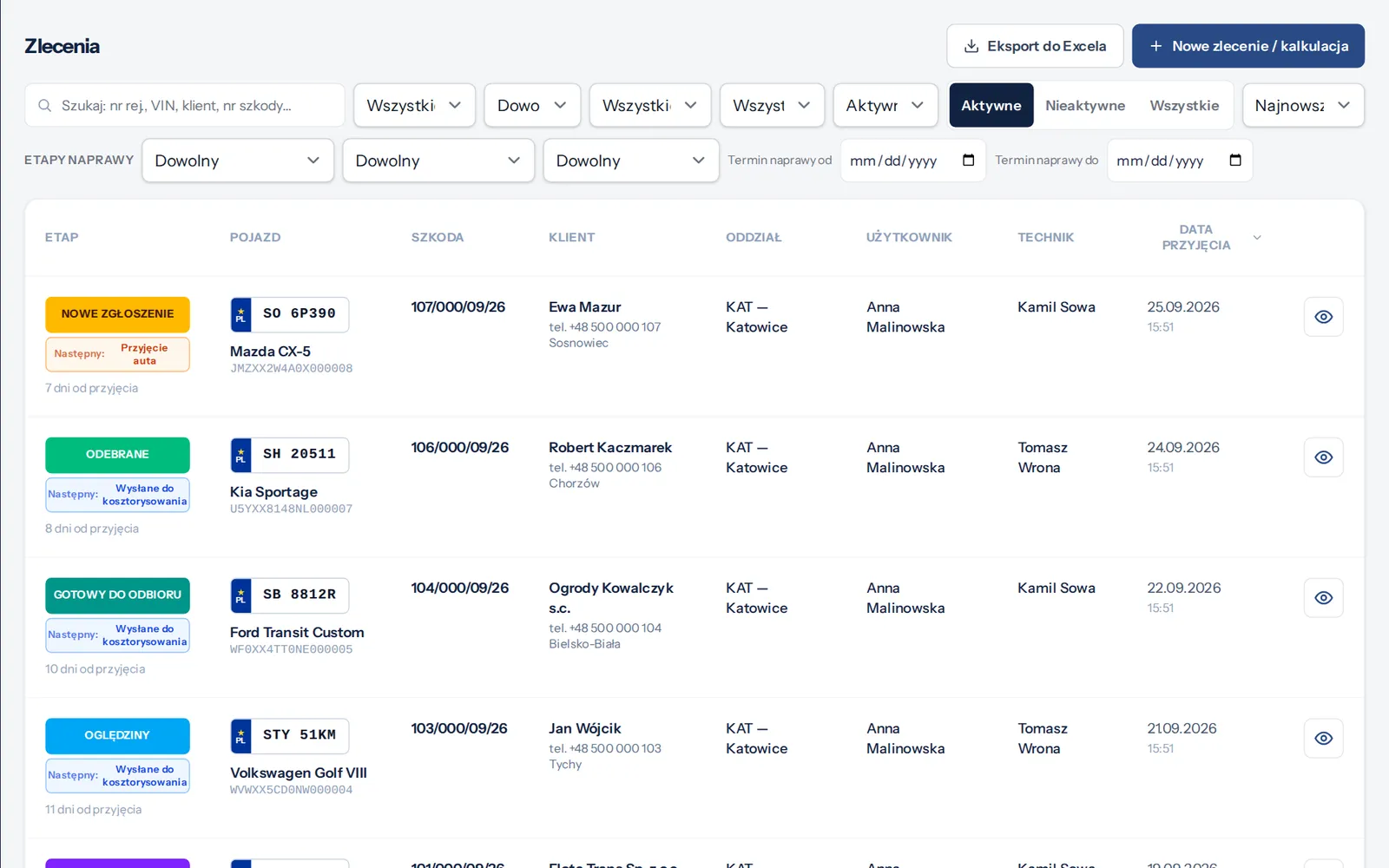
WE-PDR job list with a progress bar for each damage case
Technical assessment of hail damage on a phone — vehicle body map
All in one system
Problem and solution

One damage case. One set of documents. One up-to-date status.

Photos on the technician’s phone, documents in messages, the estimate in a separate program and arrangements passed on by phone slow work down and increase the risk of mistakes.

Without a shared system

  • Photos scattered across phones and messaging apps
  • Inspection data retyped by hand into the estimate
  • Attachments hunted down in several mailboxes
  • Repair status checked by phoning several people

With WE-PDR

  • Photos, documents and the estimate attached to the job
  • The estimate calculated from the same data as the inspection
  • Documents and the gallery link sent from the app
  • Progress bar and activity history visible to the team

Open a case and you immediately see the photos, documents, estimate, notes, activity history and current repair stage. The technician and the office work on the same data, so you make decisions faster and stop wasting time looking for information.

Features

The whole PDR damage process — from inspection to billing

Inspection

The technician inspects the car. The office can act right away.

Carry out the inspection right at the vehicle. Mark the damaged panels on the body map, describe the extent of the damage and add photos. Read the VIN and number plate with your phone camera. Data saved by the technician reaches the office without manual retyping or extra phone calls.

From the inspection you can generate a technical assessment PDF with photos. The documentation is attached to the job, so every authorised team member can quickly check the extent of the damage and the next tasks.

Technicianless admin work at the car
Officefaster access to complete data
Workshopshorter time from inspection to repair decision
See details: Inspection and technical assessment →
Vehicle body map with marked damage in a WE-PDR technical assessment
Photos

Document without limits. Share photos without delay.

A large number of photos doesn’t have to slow you down. WE-PDR shrinks photos on the phone before sending them and uploads them in the background — you can keep working in the meantime.

Weak or briefly lost signal doesn’t mean lost documentation. Photos wait in a queue on the device and send themselves once the connection is back — no need to take them again.

Share the photo gallery with a single link. The recipient opens the complete documentation in a browser, with no bundles of large attachments in their inbox.

Resultfewer email problems, faster handover of the damage case and organised documentation for every vehicle
See details: Damage photos and gallery →
Hail damage photo gallery in a WE-PDR job
Cost estimate

Prepare PDR estimates faster and price with your own rates.

Go from inspection to estimate without retyping data into another program. WE-PDR prices PDR repairs from a flat-rate table, includes amounts for removal and refitting, replacement and painting, and uses the price list that applies in your company.

No waiting for an external estimate. You prepare the calculation when you need it — following your own process and agreed rates. You enter removal and refitting, replacement and paint amounts according to the norms you use every day.

Compare the cost of a PDR repair with the cost of replacing the panel and see what percentage of the vehicle’s value the repair represents. It’s easier to judge whether a repair pays off and to reduce the risk of pricing errors.

Technicianestimate prepared from the completed inspection
Workshopyour own rates and more control over margins
Companya consistent way of pricing across all branches
See details: PDR cost estimate →
WE-PDR PDR cost estimate calculator with live pricing
Documents and sending

Complete damage documentation, ready when you need it.

Add customer, workshop and insurer documents to the job. Generate the technical assessment and the calculation as PDFs directly in the app. Send selected files and photos by email from the specific damage case.

No more time spent gathering attachments, searching through messages and sending photos separately. You prepare the documentation in one place and send it from the app together with a link to the gallery.

Resultfaster claim handling, fewer missing attachments and full control over what has been sent
See details: PDF documents and sending →
Claim file with PDF documents in WE-PDR
Job management

Always know what’s happening with every damage case.

All jobs are on one list. The progress bar shows whether a case is waiting for inspection, estimate, approval, parts, repair, documents or billing.

For every job you can save notes and check the activity history — who did what and when. You don’t have to ask several people to find out what has been done and what’s still left.

When you need data for planning, analysis or billing, export your jobs to an Excel spreadsheet.

Coordinatora quick view of team workload and case statuses
Officefewer phone calls and less manual checking
Ownerbetter control over deadlines and job flow
See details: Jobs and repair stages →
WE-PDR job list with repair stages and filters
Workshop organisation

Manage technicians, branches and appointments from one place.

Create branches and organise your technicians’ work in one system. Plan appointments in the calendar and create new jobs directly from its view. The staff rota shows who works when and at which workstation.

Information about the vehicle, damage, appointment and assigned work is available to the whole team. Everyone knows what to work on, and the manager reacts faster to delays and schedule changes.

Send SMS messages to customers from the system — confirmations, appointment reminders and a “your car is ready” message — without copying numbers into a separate tool.

Single workshopan organised calendar and less admin work
Multiple branchesshared standards, a central overview and smoother handover of jobs between locations
See details: Calendar and team →
WE-PDR repair calendar split by workstations
How WE-PDR works

From the first photo to closing the case — without losing information.

Five steps, in the same order for every job. Each step leaves a trace in the case history.

  1. Create a job

    Add the vehicle and customer or create a new case directly in the calendar. The system recognises whether the car is already in the database and won’t let you add it twice.

  2. Carry out the inspection

    The technician marks the damage on the body map and takes photos at the vehicle. The office sees the latest data once it’s uploaded, with no retyping of notes.

  3. Prepare the estimate and documents

    Use your own price list and generate the technical assessment and PDR calculation as PDFs. Add customer, workshop or insurer documents.

  4. Run the repair

    Assign work to a technician, plan repair stages at your locations, update progress and record arrangements. The whole team sees what’s been done.

  5. Hand over the documentation and close the case

    Send documents and photos from the app, share the gallery and export jobs to Excel for billing.

Who it’s for

WE-PDR adapts to the way your company works.

Pricing method

How WE-PDR calculates a hail damage repair estimate

Four steps, in the same order for every vehicle. The method is transparent and repeatable, so every figure in the document always has a visible origin.

  1. 01

    Panel-by-panel inspection

    On a schematic body map you mark the damaged panels: bonnet, roof, wings, doors, tailgate. Each panel has a material (steel or aluminium) and a note on whether it needs painting.

  2. 02

    Counting dents by size

    Dents are recorded in size ranges. Dents up to 40 mm count towards the price tier; larger ones are charged separately as a per-dent surcharge — because repairing them is a different job.

  3. 03

    Flat rate from the tier table

    The total number of dents across the whole vehicle determines the tier in the flat-rate table — you don’t price each panel from scratch. Above 100 dents, a fixed amount is added for each additional dent.

  4. 04

    Total loss threshold and the decision

    Comparing the repair cost with the vehicle’s value gives a percentage, which the system shows as a colour. From 70% total loss is flagged, and for every panel you see whether it’s cheaper to repair or replace.

Total loss threshold — the colour says it all

0–50%
Safe
51–60%
Caution
61–69%
High risk
≥ 70%
Total loss

Hail damage estimating terms

PDR (paintless dent repair)
Paintless Dent Repair — removing dents without filler or repainting, by pushing and pulling the metal back into shape. It keeps the factory paint, so the car doesn’t lose value through a paintwork history. See details →
Cumulative dent count
A principle where dents from the whole vehicle add up to a single number, and that number selects the price tier in the flat-rate table. That’s why the price per dent falls as the damage gets bigger. See details →
Total loss
A situation in which the repair cost exceeds a set percentage of the vehicle’s value and repair is no longer economical. WE-PDR calculates this percentage live and flags it red from 70%. See details →
Pricing

You pay per job, not per user.

Creating an account is free and needs no card. You pay per job — and a licence, if you choose one, lowers the price of every job. No per-user fees.

There are two fees: the licence (fixed, optional) and a fee for every job you generate. An active licence lowers the job fee.

Without a licence
Licence fee
PLN 0

No licence fee. You pay only for jobs where you need a full cost estimate.

With a licence
Licence fee
PLN 199 net / month

A fixed licence fee — in return every full job costs much less and you also get the Standard version.

Preview

Quick flat-rate quote
Fee per job
Without a licence
PLN 0
With a licence
PLN 0
gross per job
  • Assessment on the body map
  • Flat rate from the tier table
  • Result on screen
  • Job list and calendar
  • Not included: Photos and documents
  • Not included: PDF documents
  • Not included: Removal and refitting, replacements and paint

Standard

Full job handling, flat-rate quote
Fee per job
Without a licence
licence only
With a licence
PLN 10
gross per job
  • Everything in Preview
  • Photos and gallery
  • Documents in the claim file
  • Technical assessment PDF
  • Job history
  • Not included: Removal and refitting, replacements and paint
  • Not included: Your company’s own price list
  • Not included: Calculation PDF
Full estimate

Full version

Cost estimate and complete documents
Fee per job
Without a licence
PLN 49
With a licence
PLN 20
gross per job
  • Everything in Standard
  • Removal and refitting, replacements and paint
  • Your company’s own price list
  • Repair vs replace — comparison
  • Total loss threshold
  • Technical assessment and calculation PDFs

Workshop licence

Licence fee: PLN 199 net / month

We activate licences on request — tell us how many technicians and branches you have and we will prepare an offer.

Ask about a licence

No limit on team accounts and no per-user fees.

Companies top up their account by bank transfer or card and receive a VAT invoice.

Knowledge base

Guides on hail damage and PDR repair

All articles →
FAQ

Frequently asked questions about WE-PDR

Is WE-PDR just a damage calculator?

No. The repair calculation is just one feature. WE-PDR covers the whole process: inspections, photos, documentation, cost estimates, repair planning, team management and handing over materials.

Can I use my own price list?

Yes. You set up the price list used in your company and apply it to your estimates. You keep consistent rates in the workshop and across all branches.

What happens to photos when the internet connection is poor?

Photos are shrunk on the phone and uploaded in the background. When the signal drops or disappears, they wait in a queue on the device and send themselves once the connection is back — no need to retake them.

Can the office see the inspection results?

Yes. Changes to the job reach the office once the data is uploaded, when the device is connected to the internet. The office can prepare the estimate, documents and next steps sooner.

Can I share photos without sending them as attachments?

Yes. You share a link to the job gallery. The recipient views the photos in a browser, without large files being sent.

Does WE-PDR work on phones and tablets?

Yes. It’s a web app — it runs in the browser on a phone, tablet or computer, during inspections, in the workshop and in the office. You can also add it to your phone’s home screen.

Is WE-PDR suitable for a company with multiple branches?

Yes. You create branches, assign staff and jobs to them, keep a shared job list and maintain one standard for documenting damage across the whole company.

How much does WE-PDR cost?

Creating an account is free. You pay for jobs where you use the full cost estimate and PDF documents — not for the number of users. Current prices are in the Pricing section.

Can the documents carry my company logo?

Yes. You set your logo and company details, which appear in the interface and in the technical assessment and calculation PDFs.

Do I need to install anything?

No. All you need is a browser. You create an account in a few minutes and can set up your first job straight away.

Speed up damage handling and regain control over your team’s work.

Run PDR inspections, cost estimates, documents and repairs in one system. Cut down on manual retyping and check the status of every damage case without phoning several people.